Auto reply for your Facebook page — comments, Messenger, and orders in the chat

"Price?" "Delivery charge?" "Where is my order?" — the same questions hundreds of times a day. Connect your page and SellPunch answers from your real shop data, and only what needs you comes to you.

Meta reviews every app that works with Facebook pages. SellPunch is in that review now — once it is approved, this turns on for every shop. Meanwhile you can open an account and use the website and every other feature.

No card needed Website live in 1 minute Runs on your phone

From BDT 499 a month · first 30 days free · no card needed · All plan prices

sellpunch.com
Facebook auto reply — SellPunch
Facebook auto reply — on mobile
What you get

Facebook auto reply with SellPunch

Price and link in the inbox

When a post has a product code (#P12), commenters get that product's name, price and order link in their inbox, plus a short reply under the comment. Once per person per post, so it never spams.

Hide comments with phone numbers

Comments with a customer's number, links to other pages or words you choose are hidden automatically, so other sellers cannot take your customers' numbers.

Messenger answers, day and night

Prices, delivery charges, payment rules, address and return policy, answered from your shop data instantly. Understands Bangla, English and Banglish ("dam koto").

Orders right in the chat

The bot asks size, quantity, name, mobile, address and area and creates the order — cash on delivery, stock-checked, blocked numbers refused. It lands in your order list.

Order updates on Messenger

Confirmed, handed to the courier (with tracking code), delivered — customers hear it on Messenger, no SMS cost. Ask "where is my order?" and the bot answers.

Your own Q&A

Size charts, fabric, exchanges — write the answer once for questions you get every day, and see how often each one was sent.

A person when needed

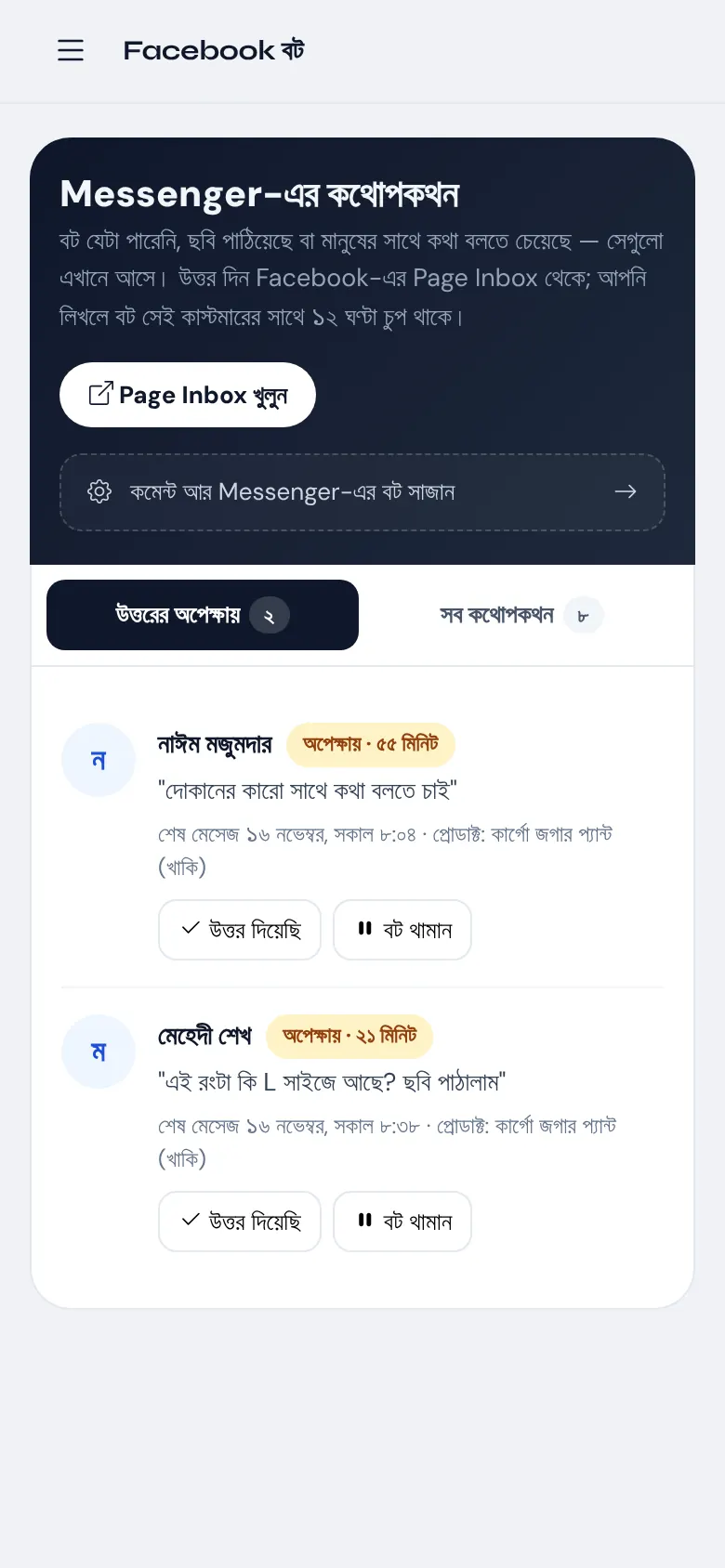
If a customer asks for a person or sends a photo, the bot steps aside and the chat joins your waiting list. When you reply yourself, the bot stays quiet with that customer for 12 hours.

Sales from Facebook

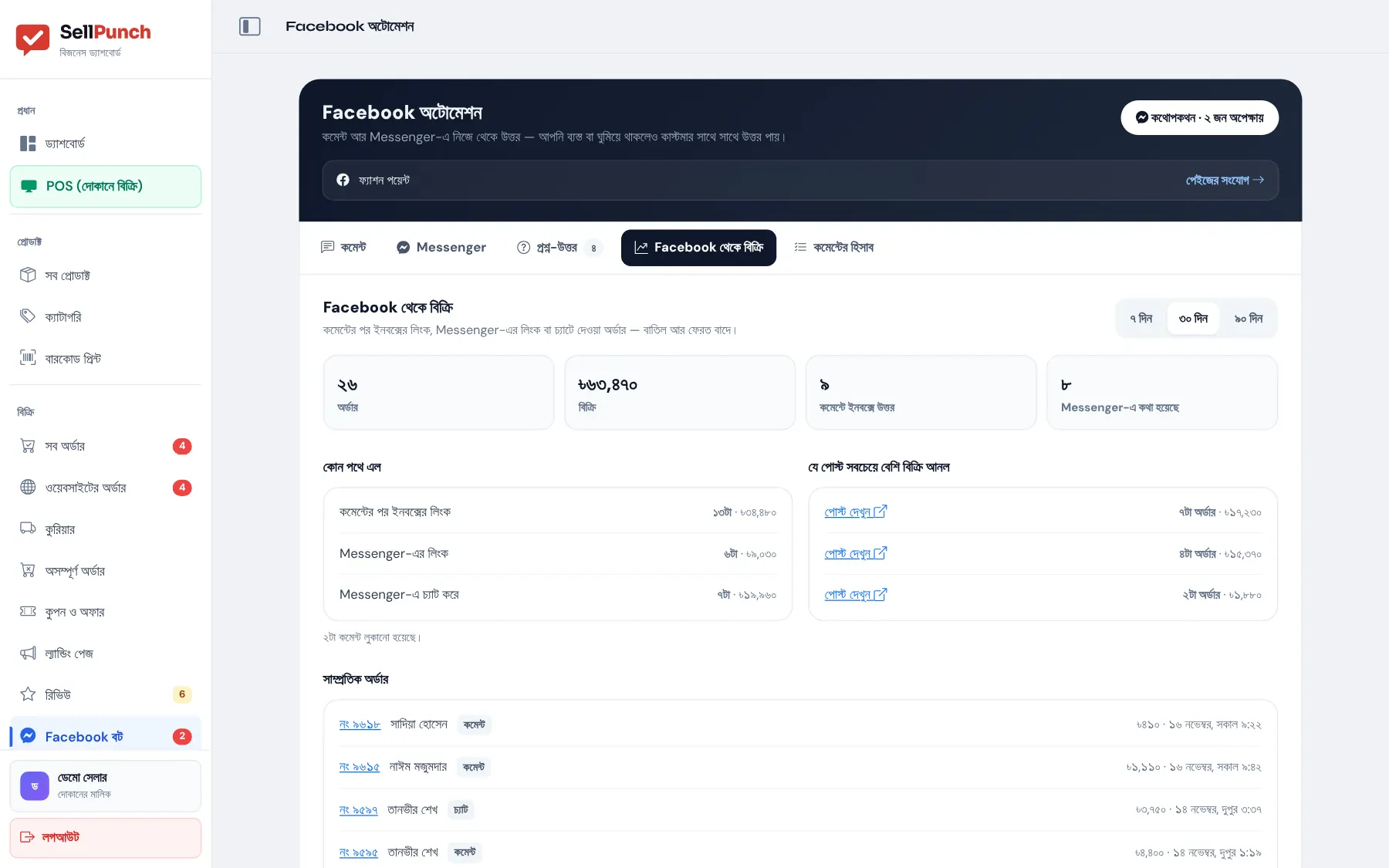
Orders and revenue from comments, Messenger links and chat orders — and which post sold the most, so your boost money goes to the right post.
How to start

Start in 1 minute, take your first order today

1

Open an account

Your shop and website are live in 1 minute; add product photos and prices.

2

Connect your Facebook page

Settings → Facebook → choose your page. Comment and Messenger auto reply start right away.

3

Add codes to posts

Write the product code (#P12) in a post — commenters get that product's price and order link in their inbox.

FAQ

Questions people ask

How do I turn on auto reply for my Facebook page?

Open a SellPunch account and connect your page from Settings → Facebook — comment and Messenger auto reply start right away. Then set your welcome message, your own Q&A and which comments to hide. The guide centre has a step-by-step guide (in Bangla).

How is it different from Meta Business Suite auto replies?

Meta's automated replies send the same pre-written text. SellPunch answers from your real shop data — the price of a product, whether it is in stock, the delivery charge for an area, where an order is — and takes orders in the chat straight into your order list. Do not run both at once.

Which plans include it, and what does it cost?

Standard (BDT 999 a month) and Premium (BDT 1,999 a month), and the 30-day free trial. There is no extra charge for comment or Messenger replies.

What if the bot does not understand, or the customer wants a person?

The bot says someone from the shop will reply soon and the chat joins your "waiting" list. When you reply from the Page Inbox, the bot stays quiet for 12 hours; you can also pause it for any customer.

Does the bot reply in English?

Yes. If your store is set to English, the bot's replies, buttons and order updates are in English. It also understands customers writing in Bangla, English or Banglish.

Does it follow Facebook's 24-hour rule?

Yes. After 24 hours from a customer's last message Facebook does not allow ordinary messages, so only that customer's order updates (confirmed, courier, delivered) are sent, using Facebook's approved method.

Open your shop today

Your website is live in 1 minute. 30 days free, no card — if you do not like it, do nothing.